Leverage access to the update loop in order to control physics and rendering separately.
I'm exploring how to build user interfaces with physics. My project is a 2D infinite canvas with a camera that can zoom, made with SpriteKit. In a 2D engine, the concept of zooming must be implemented with scaling, since there is no Z dimension where the camera would actually move away from a plane. Being closer or farther away from the content plane means that either the content or the UI are no longer at their nominal scale.
Zooming an SKCameraNode is done by scaling it. The content remains at its nominal scale, while any node that is a child of the camera, i.e. the UI, will match its transforms.
In SpriteKit, all physics bodies are simulated in scene coordinates inside a single physicsWorld. If a node is a child of the camera and is scaled, its physics body will scale as well, therefore changing its physical properties: mass, collision thresholds, relative joint anchor positions, and so on. This affects the physical behavior of nodes in camera space, especially non-linear physics behavior such as springs.
In the video below, two discs are connected by a spring joint and are in camera space. As the camera zooms in and out, the discs move apart or closer together. This is because their joint anchors are simulated in scene space, while the circles are being scaled with the camera. This is obviously not desirable. The joined bodies remain stable regardless of camera zoom.
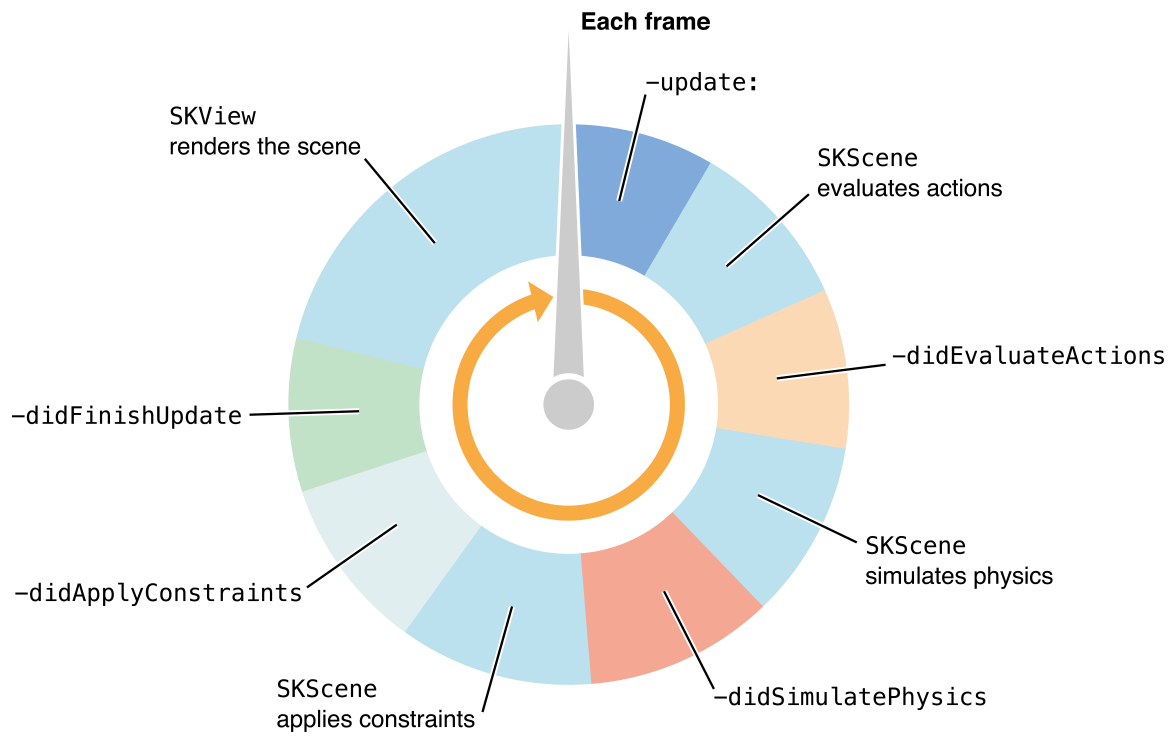
Fast forward a few weeks later. I was working on recording a SpriteKit view to disk. I needed to output a sequence of images from any SpriteKit animation and choose which node would be recorded. The solution involved toggling the visibility of specifics nodes at specific moments in the SpriteKit run loop:
 Media unavailable: SpriteKit-Run-Loop.png
I was able to target which node to render, by running code at different moment in time during a single frame update. That gave me an idea: could I use the same approach for physics UI?
It turns out, yes! For every frame, I temporarily remove the camera transforms from the UI nodes before SpriteKit simulates physics in update. Then, after the physics step is complete, I apply the camera transform just before rendering:
/// The parent node that contains all UI bodies.
let scalablePhysicsLayer = SKNode()

/// The first step of a frame
override func update(_ currentTime: TimeInterval) {
    /// Put all physical bodies in scene space.
    putPhysicalObjectsInScene()
}

/// The last step before SKView renders the frame
override func didFinishUpdate() {
    /// After physics and before rendering, match camera transforms.
    /// This will be a visual operation only, since we are doing it after physics.
    putPhysicalObjectsInCamera()
}

/// Remove camera transforms.
func putPhysicalObjectsInScene() {
    scalablePhysicsLayer.position = .zero
    scalablePhysicsLayer.setScale(1)
    scalablePhysicsLayer.zRotation = 0
}

/// Match camera transforms.
func putPhysicalObjectsInCamera() {
    scalablePhysicsLayer.position = inertialCamera.position
    scalablePhysicsLayer.xScale = inertialCamera.xScale
    scalablePhysicsLayer.yScale = inertialCamera.yScale
    scalablePhysicsLayer.zRotation = inertialCamera.zRotation
}
The video below shows the same joined discs as before, but with the new scalable physics setup:
"But nothing is happening in this video" Exactly! The spring joint remains stable regardless of camera zoom. The physics debug outlines stay in simulation space, while the node visuals are transformed to match the camera.
This was a revelation: a frame is constructed in multiple steps in a given order. We can choose what to do before and after physics, or before and after rendering.
Links
-
Achraf Kassioui, SpriteKit Inertial Camera, 2024.