Render SpriteKit directly into a Metal view with SKRenderer instead of SKView/SpriteView. This setup provides more control over the rendering pipeline, and runs more smoothly on some devices like iPhone 13.
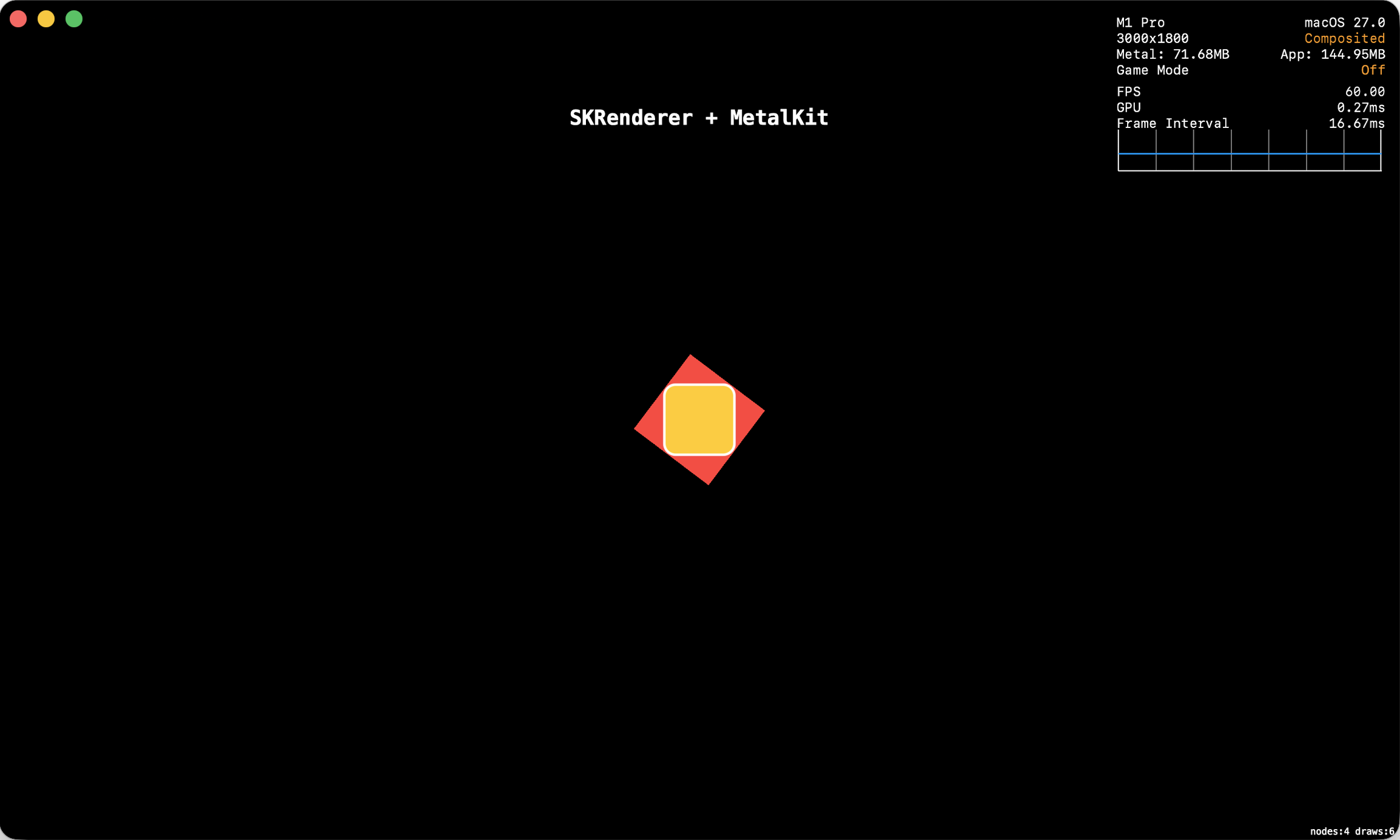
I wrote a minimal setup that renders a SpriteKit scene with SKRenderer and MTKView. The screenshot below shows a simple SpriteKit scene running on macOS 27 in a MetalKit view with the Metal HUD enabled:
 Media unavailable: SKRenderer-MTKView.png
Setting up MTKView is surprisingly approachable. It automatically handles many details such as pixel format and color space. If MTKView conforms to MTKViewDelegate, it will automatically refresh the view and drive the scene and render updates.
Here is the structure of the draw function of MTKView, called for each new frame:
func draw(in view: MTKView) {
    /// Metal pipeline
    guard let commandBuffer = commandQueue.makeCommandBuffer(),
          let renderPassDescriptor = currentRenderPassDescriptor,
          let drawable = currentDrawable
    else {
        return
    }

    renderPassDescriptor.colorAttachments[0].loadAction = .clear
    renderPassDescriptor.colorAttachments[0].storeAction = .store
    renderPassDescriptor.colorAttachments[0].clearColor = clearColor

    /// Call all SKScene update methods
    renderer.update(atTime: CACurrentMediaTime())

    /// Render the scene
    renderer.render(
        withViewport: CGRect(origin: .zero, size: drawableSize),
        commandBuffer: commandBuffer,
        renderPassDescriptor: renderPassDescriptor
    )

    commandBuffer.present(drawable)
    commandBuffer.commit()
}
This setup is a base to explore custom Metal rendering with SpriteKit. Each frame:
-
Render the scene into a Metal texture with SKRenderer.
-
Render other Metal passes.
-
Composite the final output which will be presented by MTKView.
Below is the full code file. It includes a regular SpriteView, which you can use to compare both rendering paths.
/**

 # SKRenderer + MetalKit View

 A minimal setup to render a SpriteKit scene with SKRenderer and MTKView.

 The same scene can run in two modes:
 - Presented with SpriteView/SKView.
 - Rendered manually with SKRenderer and MTKView.

 This setup is a base for custom Metal rendering with SpriteKit:
 Render the scene, render extra Metal passes, then composite the final output.

 Achraf Kassioui
 Created 30 Jun 2026
 Updated 4 Jul 2026

 */
import SwiftUI
import SpriteKit
import MetalKit

// MARK: SwiftUI
/**

 Use this view to present SpriteKit with SKView.

 */
struct MinimalSpriteView: View {
    /// Init scene with arbitrary size. The scene scale mode will match the size to the host view.
    @State private var scene = SampleScene(size: CGSize(width: 200, height: 200))

    var body: some View {
        SpriteView(
            scene: scene,
            preferredFramesPerSecond: 120,
            options: [.ignoresSiblingOrder],
            debugOptions: [.showsFPS, .showsNodeCount, .showsDrawCount]
        )
        .ignoresSafeArea()
        .background(.black)
    }
}

/**

 Use this view to present SpriteKit with SKRenderer and MetalKit.

 */
struct MinimalSKRendererMetalKitView: View {
    /// Init scene with arbitrary size. The scene scale mode will match the size to the host view.
    @State private var scene = SampleScene(size: CGSize(width: 200, height: 200))

    var body: some View {
        MinimalMetalKitViewRepresentable(scene: scene)
            .ignoresSafeArea()
            .background(.black)
    }
}

struct MinimalMetalKitViewRepresentable: UIViewRepresentable {
    let scene: SampleScene

    func makeUIView(context: Context) -> MinimalMetalKitView {
        MinimalMetalKitView(scene: scene)
    }

    func updateUIView(_ metalView: MinimalMetalKitView, context: Context) {

    }
}

// MARK: MetalKit View

class MinimalMetalKitView: MTKView, MTKViewDelegate {

    // MARK: Properties

    let scene: SampleScene
    private let renderer: SKRenderer
    private let commandQueue: MTLCommandQueue

    // MARK: Lifecycle

    init(scene: SampleScene) {
        /// Create what SKRenderer needs
        guard let device = MTLCreateSystemDefaultDevice() else {
            fatalError("Could not create Metal device")
        }

        guard let commandQueue = device.makeCommandQueue() else {
            fatalError("Could not create Metal command queue")
        }

        self.scene = scene
        self.renderer = SKRenderer(device: device)
        self.commandQueue = commandQueue

        /// Init the view with the same device as SKRenderer
        super.init(frame: .zero, device: device)

        /// Conform to MTKViewDelegate to make the view auto refresh and drive the update cycle
        delegate = self

        isMultipleTouchEnabled = true
        contentMode = .center /// Optional, better behavior during device rotation
        preferredFramesPerSecond = 120 /// Limited to 60 otherwise

        /// Setup SKRenderer
        renderer.scene = scene
        renderer.ignoresSiblingOrder = true
        renderer.showsNodeCount = true
        renderer.showsDrawCount = true
    }

    required init(coder: NSCoder) {
        fatalError("init(coder:) has not been implemented")
    }

    // MARK: Render Loop
    /**

     `mtkView` and `draw` are both methods of the MTKViewDelegate protocol.

     */
    /// Called whenever the view size is about to change
    func mtkView(_ view: MTKView, drawableSizeWillChange size: CGSize) {

    }

    /// Called for each new frame to render
    func draw(in view: MTKView) {
        /// Metal pipeline
        guard let commandBuffer = commandQueue.makeCommandBuffer(),
              let renderPassDescriptor = currentRenderPassDescriptor,
              let drawable = currentDrawable
        else {
            return
        }

        renderPassDescriptor.colorAttachments[0].texture = drawable.texture
        renderPassDescriptor.colorAttachments[0].loadAction = .clear
        renderPassDescriptor.colorAttachments[0].storeAction = .store
        renderPassDescriptor.colorAttachments[0].clearColor = clearColor

        /// Call all SKScene update methods
        renderer.update(atTime: CACurrentMediaTime())

        /// Render the scene
        renderer.render(
            withViewport: CGRect(origin: .zero, size: drawableSize),
            commandBuffer: commandBuffer,
            renderPassDescriptor: renderPassDescriptor
        )

        commandBuffer.present(drawable)
        commandBuffer.commit()
    }

    // MARK: Touch
    /**

     Input is intercepted by this view, and forwarded to the scene.
     Important: convert coordinates from UIView to SKScene before sending.

     */
    override func touchesBegan(_ touches: Set<UITouch>, with event: UIEvent?) {
        for touch in touches {
            scene.beginDrag(for: touch, at: scenePoint(from: touch.location(in: self)))
        }
    }

    override func touchesMoved(_ touches: Set<UITouch>, with event: UIEvent?) {
        for touch in touches {
            scene.updateDrag(for: touch, to: scenePoint(from: touch.location(in: self)))
        }
    }

    override func touchesEnded(_ touches: Set<UITouch>, with event: UIEvent?) {
        for touch in touches {
            scene.endDrag(for: touch)
        }
    }

    override func touchesCancelled(_ touches: Set<UITouch>, with event: UIEvent?) {
        for touch in touches {
            scene.endDrag(for: touch)
        }
    }

    /// UIKit view coordinates start at the top-left.
    /// The scene uses anchorPoint 0.5, so scene origin is the view center.
    private func scenePoint(from viewPoint: CGPoint) -> CGPoint {
        return CGPoint(
            x: viewPoint.x - bounds.width * 0.5,
            y: bounds.height * 0.5 - viewPoint.y
        )
    }

}

// MARK: Scene

class SampleScene: SKScene {

    // MARK: Properties

    private var activeDrags: [UITouch: DragState] = [:]
    private var titleLabel: SKLabelNode?

    struct DragState {
        let node: SKNode
        let offset: CGPoint
    }

    // MARK: Lifecycle

    override init(size: CGSize) {
        super.init(size: size)

        scaleMode = .resizeFill
        backgroundColor = .black
        anchorPoint = CGPoint(x: 0.5, y: 0.5)

        cleanup()

        createContent()
    }

    required init?(coder aDecoder: NSCoder) {
        fatalError("init(coder:) has not been implemented")
    }

    override func didMove(to view: SKView) {
        size = view.bounds.size
        view.isMultipleTouchEnabled = true
        view.contentMode = .center
    }

    override func didChangeSize(_ oldSize: CGSize) {
        updateLabel()
    }

    deinit {
        cleanup()
    }

    private func cleanup() {
        removeAllChildren()
        activeDrags.removeAll()
    }

    // MARK: Content

    private func createContent() {
        let label = SKLabelNode()
        label.fontName = "Menlo-Bold"
        label.fontSize = 22
        label.zPosition = 30
        label.name = "draggable"
        addChild(label)
        titleLabel = label

        let sprite = SKSpriteNode(color: .systemRed, size: CGSize(width: 100, height: 100))
        sprite.zPosition = 10
        sprite.name = "draggable"
        addChild(sprite)

        let action = SKAction.rotate(byAngle: .pi, duration: 1)
        sprite.run(SKAction.repeatForever(action))

        let shape = SKShapeNode(rectOf: CGSize(width: 75, height: 75), cornerRadius: 12)
        shape.lineWidth = 3
        shape.fillColor = .systemYellow
        shape.zPosition = 20
        shape.name = "draggable"
        addChild(shape)
    }

    private func updateLabel() {
        let text = view != nil ? "SKView" : "SKRenderer + MTKView"
        titleLabel?.text = text
        titleLabel?.position = CGPoint(x: 0, y: size.height * 0.35)
    }

    // MARK: Touch

    override func touchesBegan(_ touches: Set<UITouch>, with event: UIEvent?) {
        /// `scene.view` is nil if the scene isn't presented by an SKView.
        /// Here, proceed only if the scene is presented by SKView.
        /// Otherwise, ignore touch events. The MetalKit host view will handle them.
        guard view != nil else { return }

        for touch in touches {
            beginDrag(for: touch, at: touch.location(in: self))
        }
    }

    override func touchesMoved(_ touches: Set<UITouch>, with event: UIEvent?) {
        guard view != nil else { return }

        for touch in touches {
            updateDrag(for: touch, to: touch.location(in: self))
        }
    }

    override func touchesEnded(_ touches: Set<UITouch>, with event: UIEvent?) {
        guard view != nil else { return }

        for touch in touches {
            endDrag(for: touch)
        }
    }

    override func touchesCancelled(_ touches: Set<UITouch>, with event: UIEvent?) {
        guard view != nil else { return }

        for touch in touches {
            endDrag(for: touch)
        }
    }

    // MARK: Dragging

    func beginDrag(for touch: UITouch, at scenePoint: CGPoint) {
        guard let node = draggableNode(at: scenePoint) else {
            return
        }

        /// Avoid assigning the same node to two touches at the same time.
        guard activeDrags.values.contains(where: { $0.node === node }) == false else {
            return
        }

        activeDrags[touch] = DragState(
            node: node,
            offset: CGPoint(
                x: node.position.x - scenePoint.x,
                y: node.position.y - scenePoint.y
            )
        )
    }

    func updateDrag(for touch: UITouch, to scenePoint: CGPoint) {
        guard let dragState = activeDrags[touch] else {
            return
        }

        dragState.node.position = CGPoint(
            x: scenePoint.x + dragState.offset.x,
            y: scenePoint.y + dragState.offset.y
        )
    }

    func endDrag(for touch: UITouch) {
        activeDrags.removeValue(forKey: touch)
    }

    private func draggableNode(at scenePoint: CGPoint) -> SKNode? {
        /// atPoint returns the top visible node at this scene position.
        /// If the hit node is inside a draggable parent, walk upward until that parent is found.
        var candidate: SKNode? = atPoint(scenePoint)

        while let node = candidate {
            if node.name == "draggable" {
                return node
            }

            candidate = node.parent
        }

        return nil
    }

}
Links
-
Apple Documentation, SKRenderer.
-
Apple Documentation, MTKView.